
Introduction to OrgFlow
OrgFlow is a Salesforce DevOps and data platform that adds modern version control, deployment, automation and data management practices to the Salesforce platform. It helps you and your team effectively manage environments, deployments, metadata changes, automated testing, metadata backups, and bulk data operations.
Feature overview
OrgFlow provides all the functionality you need to build, manage, automate and operate a full end-to-end Salesforce DevOps process for the vast majority of scenarios, as well as powerful data management capabilities. OrgFlow is designed to accommodate a variety of use cases out of the box, using an intuitive web-based interface. For more advanced and customized use cases, OrgFlow is also designed to be flexible and extensible, so you can script, automate, integrate and compose it into wider overall Salesforce workflows.
Here are some things you can do with OrgFlow:
DevOps
- Manage your Salesforce environments
- Continuously sync your Salesforce orgs with branches in your Git repository
- Enjoy a granular version history and continuous backup of your Salesforce metadata
- Flow metadata changes between environments
- Detect and resolve merge conflicts
- Roll back Salesforce environments to an earlier point in time
- Run Apex tests
- Manage Salesforce upgrades and API versions
Data
- Export data from any Salesforce org in your choice of file format
- Import data into any Salesforce org using insert, update, upsert or delete operations
General
- Manage your workspace and its members
- Run recurring operations unattended using schedules
- Use an intuitive web-based UI for day-to-day operations
- Use a cross-platform CLI for scripting and automation
- Securely store and share encrypted Git and Salesforce credentials
- Integrate OrgFlow with your favorite CI/CD platform
Architecture overview
OrgFlow consists of three parts — OrgFlow Web, OrgFlow CLI, and OrgFlow Cloud — which play different roles for different purposes, and work together to provide all of OrgFlow's functionality. OrgFlow integrates with, and coordinates between, your Salesforce environments, your Git repository and (optionally) your CI/CD platform, as illustrated in this diagram:
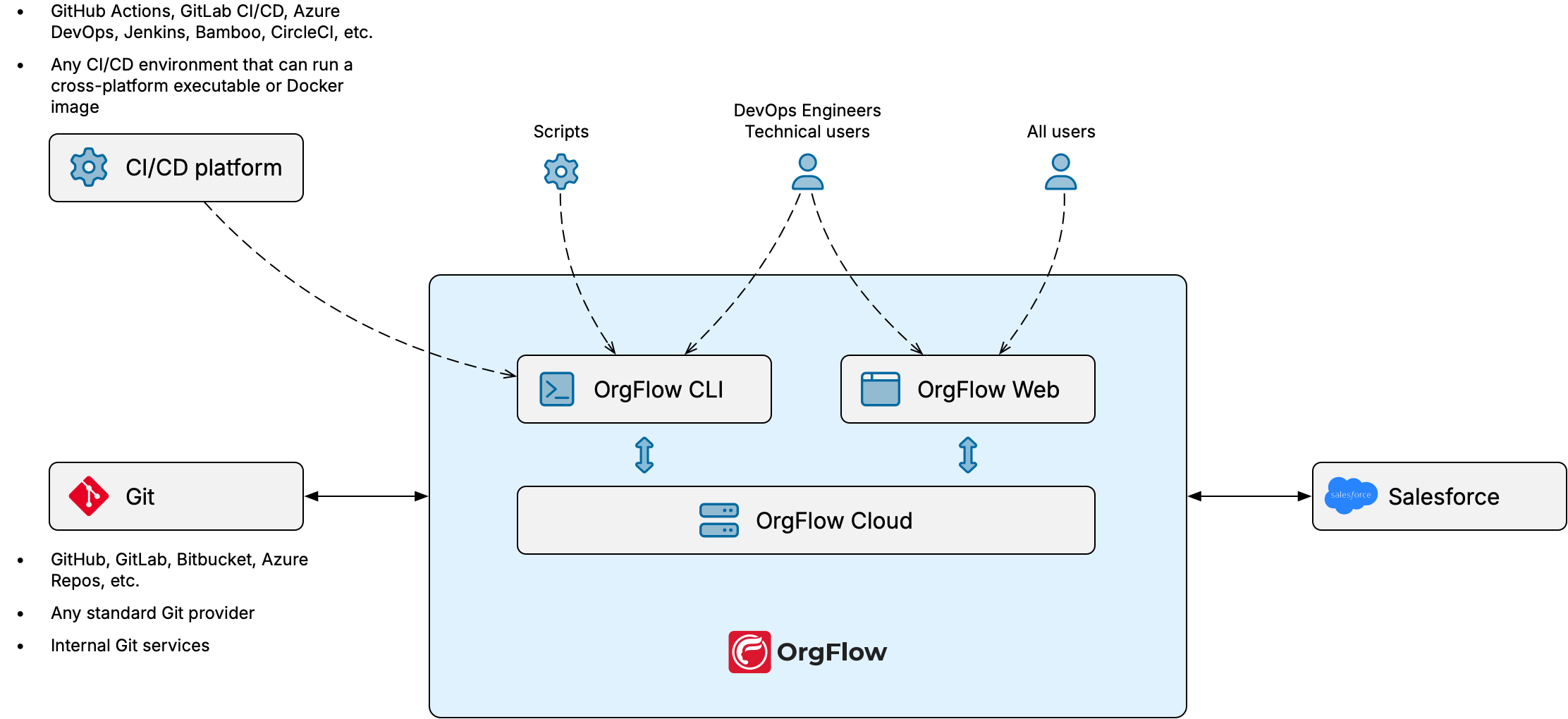
OrgFlow Web
OrgFlow Web is the main entry point to OrgFlow.
It is a web application that allows you to access the full power of OrgFlow from within a web browser. When you run workloads from within OrgFlow Web, all processing is performed on our infrastructure.
This makes OrgFlow Web a low-code to no-code solution with a very low barrier of entry, and not much of a learning curve. There's nothing to download and install — all you need is a web browser.
OrgFlow CLI
OrgFlow CLI enables more advanced or technical use cases for OrgFlow.
It is a cross-platform command line tool, available for macOS, Windows and Linux, that you can download and run on devices and infrastructure outside of OrgFlow's domain. As a command line tool, OrgFlow CLI allows you to script, automate, integrate and orchestrate bigger overall processes. Think of it as an optional companion that you can use alongside OrgFlow Web.
When you use OrgFlow CLI, all processing is performed locally on the device where you are running it.
This makes OrgFlow CLI a pro-code solution, ideal for scenarios with strict security and compliance requirements, or when you simply want to integrate and compose OrgFlow into a wider overall process. For example, you could run the OrgFlow CLI in a third-party CI/CD platform (such as GitHub Actions) to validate the deployment and Apex test coverage of pull requests before they are merged.
OrgFlow Cloud
OrgFlow Cloud is what we call all the behind-the-scenes backend services and infrastructure that power OrgFlow.
It is a collection of cloud services that do things like store all your workspace data, execute jobs that you start from OrgFlow Web, send email alerts, and keep track of the state of all your environments.
As a user you won't really interact with OrgFlow Cloud directly, but both OrgFlow Web and OrgFlow CLI use it behind the scenes to enable the kind of seamless, stateful coordination of your Salesforce orgs and the branches in your Git repository that gives OrgFlow its magic.
Salesforce
This is the only thing that you need to bring yourself. OrgFlow's DevOps and data features connect to your Salesforce orgs, and you won't be able to use OrgFlow if you don't have at least one Salesforce org. If you're reading this you probably already have a Salesforce org.
Git
For OrgFlow's DevOps features, Git plays a central role.
You might already have a Git provider, and if so you can bring your own Git repository. OrgFlow supports any standard Git repository so long as it can be accessed from our infrastructure. This includes any commercial Git provider such as GitHub, Azure Repos, GitLab, Bitbucket and so on, as well as self-hosted repositories that you might be running on internal infrastructure.
You can even use a Git repository that is not accessible to the public Internet, but then you will need to use the OrgFlow CLI to run your DevOps workloads on a device that can connect to the repository.
You can also choose to have OrgFlow create a managed GitHub repository on your behalf.
Git is not required for data operations
A Git repository is required to create a stack and to use OrgFlow's DevOps features (which use Git for metadata version control). OrgFlow's data features do not use Git and can operate against any Salesforce org, but do require a stack in which to run.
Start for free
Each OrgFlow subscription includes a limited amount of free resources. This allowance should be enough to get you up and running, and use OrgFlow's powerful DevOps and data features for a small team.
Additional resources are available on a Pay-as-you-go basis, so you can scale up gradually as your operations grow.
Learn more
See our quick start guide if you want to dive right in.
If you want some more background, read about some core concepts like workspaces, stacks and environments.
If you're interested in scripting and automating OrgFlow, consider exploring the OrgFlow CLI.
If you're feeling curious about how OrgFlow can work within the context of an external CI/CD platform, we have a demo repo for GitHub Actions that can give you an idea and some inspiration (though we'd only recommend this once you already have a solid understanding of some of the more basic things).